
Improve
Find Keywords
Discover topics and terms worth tracking in future audits.
Start with a seed keyword
Find Keywords starts from one of the brand keywords or a custom seed. The seed must be between 2 and 255 characters.
Discovery pipeline
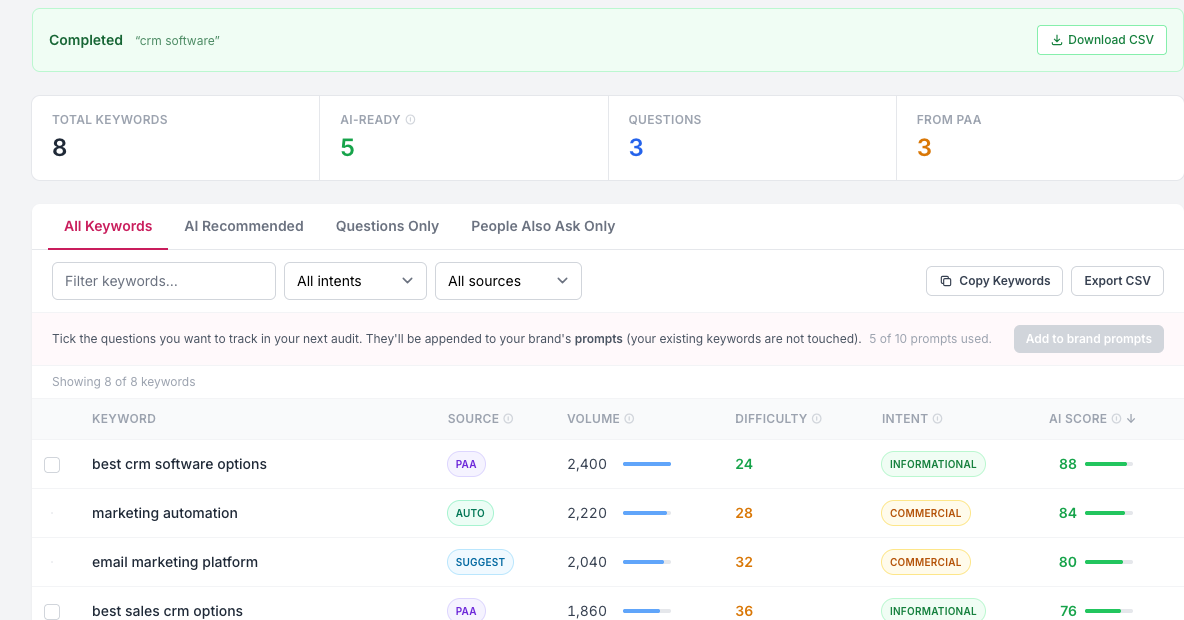
The keyword discovery job uses an eight-step research pipeline: autocomplete prefixes, People Also Ask expansion, keyword suggestions, related keywords, keyword ideas, search intent, search volume, and keyword difficulty.
Results are deduplicated case-insensitively, scored, tagged with source, intent, volume, difficulty, question status, PAA status, and whether they are recommended.
Usage limits
Find Keywords run limits are plan-based. Free access and trial teams get 1 run, Starter gets 2, Professional gets 10, and Enterprise gets 30 per billing period. Add-on credits can increase the available runs.
Save questions as prompts
Completed discovery runs allow question-shaped rows, including PAA rows, to be added to the brand prompts. The action respects the current prompt limit and ignores selected rows that are not questions.
Filters and sorting
The UI supports tabs for all results, AI-ready, questions, and PAA. It can filter by text, intent, and source, and sort by keyword, source, volume, difficulty, intent, or score.