
Brand Management
Brand dashboard
Use the dashboard to understand current brand health and next actions.
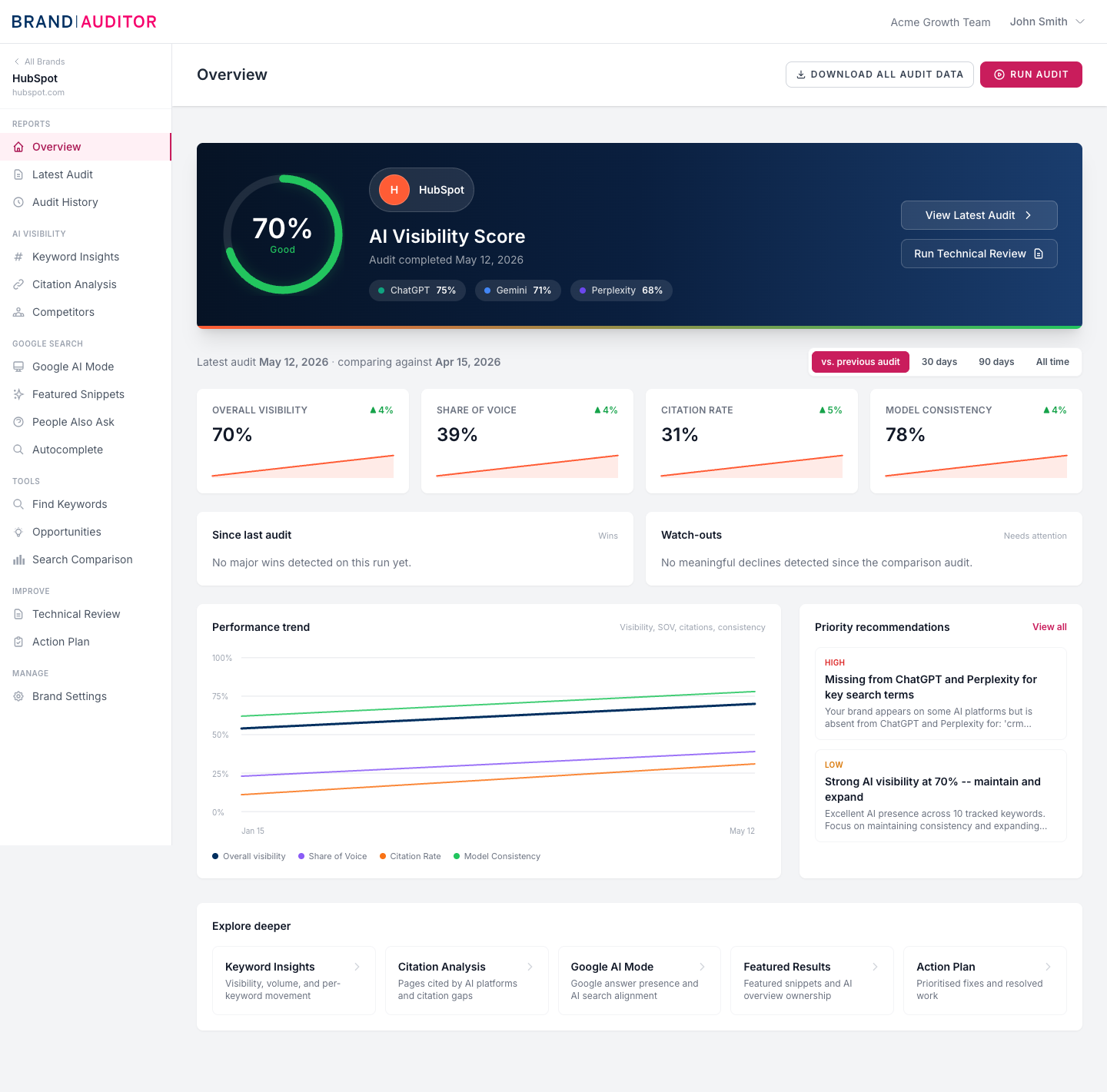
What the brand overview shows
The brand overview is built from the latest completed audit. It shows the AI Visibility Score, audit date, per-LLM platform pills where scores exist, headline cards, performance trend, wins, watch-outs, priority recommendations, and links into deeper insight screens.
If the brand has no completed audit, the page shows an empty state with a Run First Audit action, or an upgrade action for free-access users.
Use comparison periods
The overview can compare the latest audit against the previous audit, 30 days, 90 days, or all time. Comparison cards and trend lines only become useful after at least two completed audits.
Follow the Explore deeper links
The Explore deeper area routes to Keyword Visibility, Citation Analysis, Google AI Mode, Featured Snippets, and Action Plan. Locked items appear disabled when the current plan does not include that screen.
Run audits and exports from the header
The overview header contains Run Audit for eligible teams. Enterprise teams with bulk export access can also request all audit data for the brand; queued exports appear in the Recent data exports list and can be downloaded when ready.